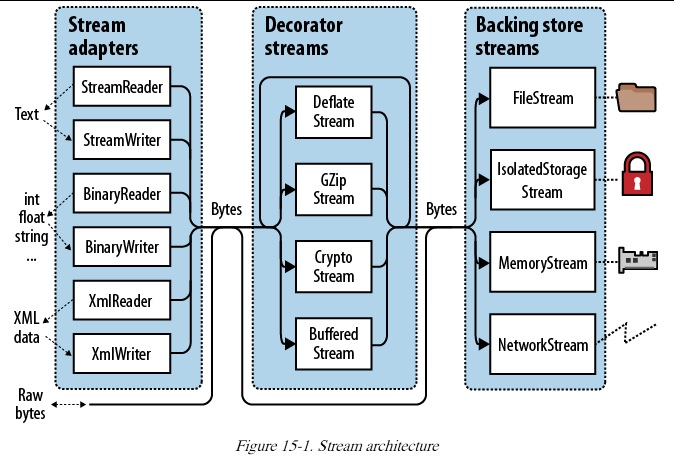
.NET 的 Stream 架構被切割成三份 (參照附圖)。
# Close 或 Dispose 一個 Decorator 會順便 Close 或 Dispose 掉附屬的 Backing Store Stream。
# Stream 並非 Thread-Safe,但所有的 Stream 子代都可以透過 Synchronized 這個 Method 來取得有上鎖的對應版本。(例如 FileStream.Synchronized)
# 關閉 Adapter 以及他附屬的 Stream 有四種作法:
1. Close the adapter only.
2. Close the adapter, and then close the stream.
3. (For writers) Flush the adapter, and then close the stream.
4. (For readers) Close just the stream.
若 Adapter 沒有呼叫過 Close 或 Dispose,那麼該 Adapter 被垃圾回收時,CLR 並不會把他附屬的 Stream Close 或 Dispose 掉 (這其實不是 CLR 的功勞,而是所有 Adapter 的實作都保證這件事)。這讓我們可以丟棄 adapter 而繼續使用他底下的 stream (注意! Decorator 就不是這樣了)。
.Net Framework 4.5 額外替 Adapter 的建構子提供了一個參數,用來標明 Close 或 Dispose 要不要順便 Close 或 Dispose 附屬的 Stream。如下程式所示:
using (var fs = new FileStream ("test.txt", FileMode.Create)) {
using (var writer = new StreamWriter (fs, new UTF8Encoding (false, true),
0x400, true))
writer.WriteLine ("Hello");
fs.Position = 0;
Console.WriteLine (fs.ReadByte());
Console.WriteLine (fs.Length);
}

沒有留言:
張貼留言